Wednesday, March 16, 2011

Cast Study

Studying apples worked! One of the main reasons for doing the apple study (in January) was to get a feel for creating realistic round objects. This process is needed for a lot of different objects that a person could paint.

Well, it worked. Last night, at my oil painting class, I was able to use two different techniques that I've been working at: ghosting and rounding. The ghosting technique (which my instructor calls it) is a method where you mass in all of the values and then using a soft brush, you smooth everything down. Then, you subsequently add more and more stronger value paints until you get what you want. This help create the roundness because the edges are now more subtle. Also, it's a great way of tying in all of the various paint values together.

So, working on a cast of a head last night, this is what I came up with. I'm pretty proud of it. It doesn't quite look like the model, but it definitely looks like a real face. The cheeks/forehead and neck is rounded appropriately.

Now, let's see if I can repeat this for Saturday's live model.

Saturday, March 12, 2011

Figure Study

Well, had some time last night waiting for my wife in the Emergency Room (She hit her jaw on the coffee table because she tripped while playing with one of our dogs. She's okay.) so I whipped out the old iPad and started working on some figure drawings. No, these nude models were not just hanging out where I was (which would have been nice... but they weren't).

Actually, there's a great new website that I found that has some awesome pictures of nude models and a timer. The site (http://pixelovely.com/tools/gesture.html) has nude male, female and animal pictures that can be studied. Not all of the images are great (there's a small percentage in which the photographer used too much light and washed out the model), but there's a significant number of them that had decent shadow/light contrast depth.

Now, this definitely doesn't replace painting/drawing from a live model, but, in terms of figure practice, this will work in a pinch. As always, I try to make sure that I do more life studies and try to translate that to my photographic studies.

Thursday, March 10, 2011

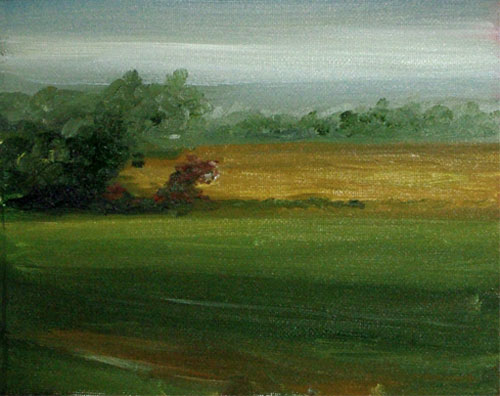
Landscape Study: 2

Newest landscape study. This was based on a photograph that I took when we were on vacation at Webster Lake, New Hampshire.

Man! Do my trees need work. So, do the foliage in the front. I was having trouble with this due to the fact that I laid on too much paint for the underlying structure. Once that is done, alla-prima is difficult to get the bright lights and dark-darks placed on the painting.

The part that I do like about this is that you get the feel of the water moving and the distance is definitely apparent. Also, there is a sense of "energy" with the painting. In my eyes, I can see the movement of the water (which is the main goal that I was trying to create). Also, the shapes for each section are interesting and non-static.

Another fun part of this painting was that I tried painting with my palette knife. This was done to lay down some textured areas in the trees and to smooth out the water (before laying in the ripples). It was fun to do. It's kind of neat "swishing" the paint around to see what happens.

Since this is only a study and not for sale, there is a sense of freedom to just play around and not worry about the results.

Wednesday, March 9, 2011

The Important Things

So, last night, I was getting set to work on my next landscape study. However, didn't get to it. My dog, Fizz (a two-year-old Bedlington Terrier puppy), has not been his usual jovial self for the last 4 days. Not eating that much. Not drinking much water. Not playing that much. Just wanting to sleep. So, my wife and I took him to the vet to see what's going on. Fortunately, nothing serious. He has a raging urinary tract infection. We got the medicine and he's mending out great.

So, as I was saying, last night, I headed over to the easel, got out the paints... and there was my little buddy... dragging his large stuffed bone over to me and just looking at me. Want to play? Of course, little Dude! So, we played tug for a while, then he went outside to play in the snow with his sister. After they came back in, figured, okay... I can now get some work done. So, I sat down on the couch to figure out what photo I wanted to study next (on my laptop).

Mr. Man (one of our nicknames for Fizz) is standing on the couch next to me, just looking at me. What? What do you want? Oh... my lap. So, I moved the laptop and he curled up on my lap and went to sleep. Now, I definitely couldn't get up. He hasn't wanted to do this for the last 4 days. So, I let him. No painting. Just hanging out on the couch with my bud.

I like to paint and I definitely need the practice. However, a sick dog who wants to just curl up with you and play with you, always trumps that.

Monday, March 7, 2011

Landscape Study: 1

Well, since doing a lot of small apples was definitely helpful in working some of my issues with still lifes, decided to try it with landscapes.

So, I have on my still life setup, my laptop positioned with a lot of landscape images. The purpose of these studies is to study tree, atmospheric effects, rocks, etc in order to have a believable landscape painting. In the summer, when I start up doing plein air painting again, these lessons should come in handy.

The one nice thing about working with photographs is that you can do multiple paintings of the same photograph in the comfort of your studio. The hard part is to not use the photograph as the actual image, but just general shapes. For me, that means that I have to remember that the things in the distance are duller and not as detailed.

So, my first attempt last night. This was fun. I like the idea of just playing around with small 8 x 10's to get the feel of the landscape, rather than the actual detail down. That will come later.

Wednesday, March 2, 2011

Photoshop: Images are different on the web

Well, yesterday, I was trying to post the image of my latest painting for the web and couldn't figure out why the image was so saturated. I tried to get the correct color and couldn't. Did some more research about it this morning and learned something about Photoshop and color proofs.

When creating your image for photoshop, the standard method to create the image for the web is to use the "Save for Web & Device". This runs the old ImageReady program. However, there are times that the image is so over-saturated. I thought that it was due to the web colors. Not true. It's due to the color profiles that are stored with the image file.

To see the image as accurately as possible, use the menu option View->Proof Setup and you will see different choices. When creating the images for the web, you should choose: Monitor RGB. This shows how the images will look on your monitor (depending how well the color is calibrated on your monitor). If you select the default, Working CYMK, this will show you more accurately how the printing of the image will come out.

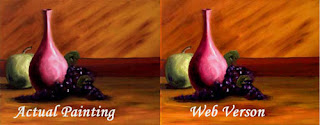
As we see in my current painting, there is a large difference between the Working CMYK (actual image) and the Monitor RGB (Web Version). The image on the left is a fairly true representation of the painting. The image on the right was the “Save to Web” version of it. It’s too highly saturated and there is too much red in it. So, by setting my view settings to “Monitor RGB”, I was able to correct the image in Photoshop to the true colors. When I posted it on the web, it was showing the colors that I expected.

Recommendation: When creating images for the web, immediately set the View->Proof Setup to Monitor RGB. Then make your adjustments to the image. When saving the image using “Save to Web”, you should see the same image as you see in Photoshop.

Note: Using this option will look good for most monitors. However, not all of the monitors. It is highly recommended that you set the color settings correctly for your monitor before creating these images. This is a simple procedure by going to Control Panel->Color Management and following the rules to calibrate your monitor. Gives the best chance of creating the correct looking image.

If you are used to using the Adobe Gamma program to calibrate your monitor, it is no longer available for Windows 7 or Vista.

Tuesday, March 1, 2011

Latest Painting: Apple, Vase, Grapes. Oh My!

"Apples, Vase, Grapes. Oh My!" is an original 14" x 18" oil painting created on a 1" stretched, high-quality canvas. The painting is presented as unframed (Sides are painted).

Traditional still life involving, you guessed it...an apple, a vase, and some grapes.

All Artwork is copyrighted to Doug Hoppes Studio and is not to be copied or reproduced in any form without the permission of the artist. Sale of this item does not transfer its copyright.